Affiliate disclosure: TechyLocker may earn a commission if you purchase through the Amazon link in this article, at no extra cost to you. Product details, pricing, availability and bundle contents can change, so check Amazon before ordering.
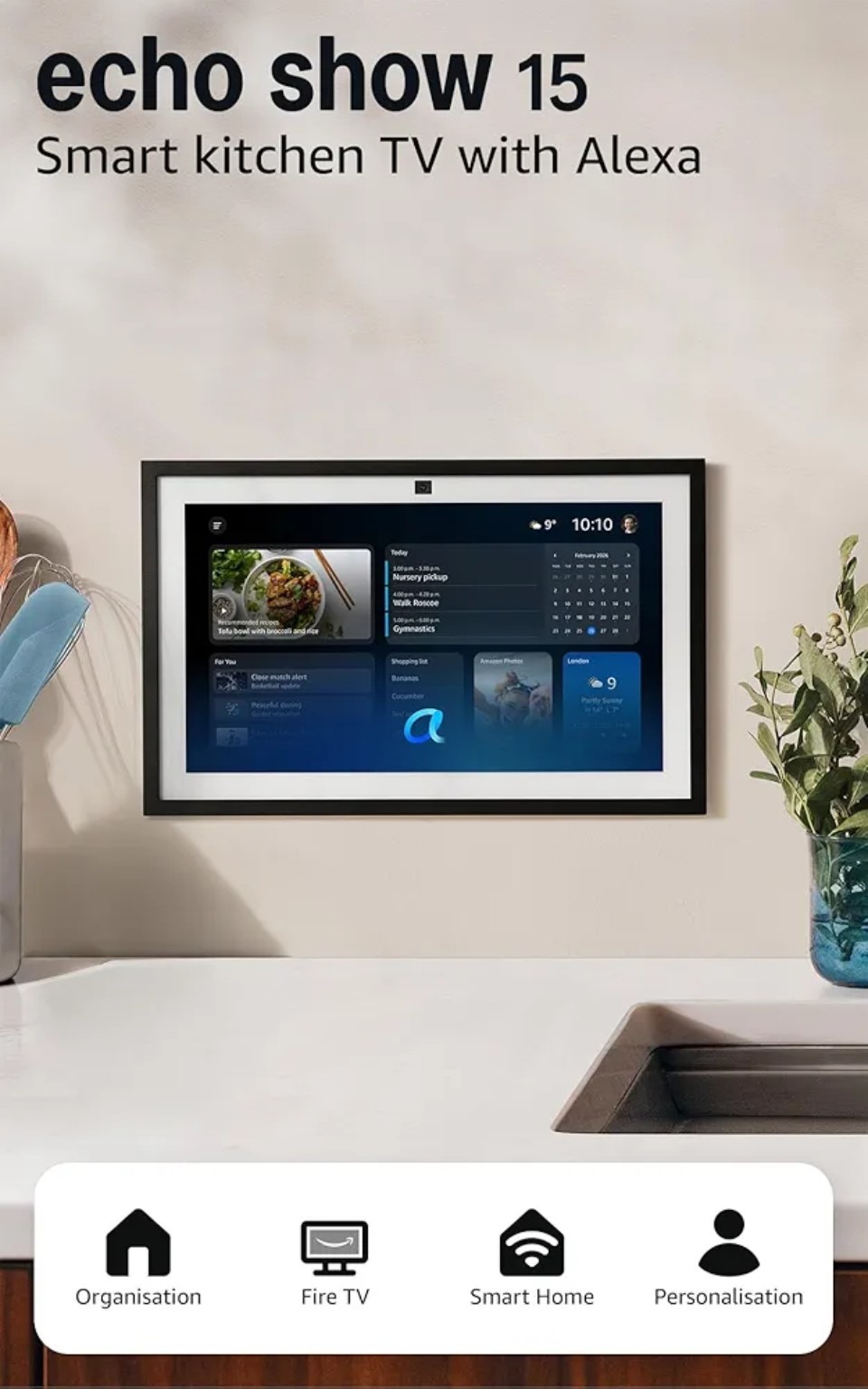
Smart displays have spent years being small, slightly awkward screens that sit on a kitchen counter and tell you the weather. The Amazon Echo Show 15 has always been the odd one out. It is big, it is built to hang on a wall like a picture frame, and it is designed to be the shared noticeboard of the whole household.
Now, with built-in Fire TV and the more conversational Alexa+ experience, it has become something far more interesting: a single screen that can run your home, entertain your family and keep everyone organised.
Check the current Amazon deal
See the latest price, availability and bundle details on Amazon before you buy.
Watch the Echo Show 15 in action
The supplied TechyLocker product walkthrough shows the Echo Show 15 and its Amazon shopping/product experience.
If you have been wondering whether this is the smart display worth putting at the centre of your home, this guide walks through everything that matters: the screen, the streaming, the new Alexa, smart-home control, the widgets, placement, sound, price and, most importantly, who should actually buy it.
Quick Verdict: Is the Echo Show 15 Worth Buying?
For most households that already use Alexa, the Echo Show 15 is the most useful smart display Amazon makes, simply because of its size. Text is readable from across the room, widgets are genuinely glanceable, and the Fire TV features mean it can double as a small television. With Alexa+ improving how naturally you can talk to it, the whole package feels less like a gadget and more like a family hub.
It is not for everyone. If you want a tiny bedside display or a premium music speaker, other Echo devices suit you better. But if you want one big, central screen, it is hard to beat at its usual price, and especially so during Amazon deals.
1. The 15.6-Inch Full HD Display
The headline feature is the screen. At 15.6 inches with Full HD resolution, the Echo Show 15 is roughly double the size of most smart displays, and the difference changes how you use it. You are not squinting at tiny tiles or walking up to the device to read a recipe. Information is large, clear and visible from the other side of the room.
In the kitchen, the size is a real advantage. Recipe steps, timers, shopping lists and the family calendar can all be read while your hands are covered in flour. A Full HD panel keeps text crisp, and photos look sharp enough that the screen works nicely as a digital frame when idle.
In the living room, it works as a secondary display for video calls, quick news briefings, music visuals and casual viewing. It is not a replacement for your main television, but it does not need to be.
In a home office, a 15.6-inch screen is a handy companion for a calendar, to-do list, weather and smart-home controls without cluttering your actual workspace.
The display is bright enough for most indoor lighting and the viewing angles are generous, which matters because a wall-mounted screen is rarely looked at head-on. As with any glossy panel, strong direct sunlight can cause reflections, so think about placement before you drill any holes.
2. Built-In Fire TV: Streaming Without Another Box
This is the feature that moves the Echo Show 15 from a smart display to a genuine entertainment device. With Fire TV built in, you can stream supported services such as Netflix and Prime Video directly on the screen, without plugging anything else in.
In practice, that is brilliant for small-space viewing. Think of a kitchen where you want something on while cooking, a teenager's room, a spare room or a flat where a full television would be overkill. You can ask Alexa to find a show, open an app or resume what you were watching, and the Fire TV interface will be familiar to anyone who has used a Fire TV Stick.
It can also act as a front end for compatible home entertainment, and the large screen makes the interface easy to browse. A few honest caveats: app availability depends on your region and the services Amazon supports, and a 15.6-inch screen will never feel like a cinema. Treat it as a very capable second screen rather than your primary TV.
3. Alexa+: What the New Alexa Adds
The biggest change to everyday use is Alexa+, Amazon's newer, more conversational take on its assistant. Where classic Alexa often needed precise phrasing, the Alexa+ experience is designed to understand more natural, flowing requests, to handle follow-ups without repeating yourself, and to be more helpful across planning, searching and home control.
Why does that matter on a screen like this? Because the Echo Show 15 is where Alexa's answers can be both heard and seen. Ask for dinner ideas and you can see ingredients and steps. Ask about your week and the calendar and reminders appear in a readable layout. Ask to dim the lights, check the front door camera and add milk to the shopping list in one go, and the screen shows what happened.
A few ways Alexa+ can change daily routines:
- More natural conversation: you can speak the way you would to a person rather than learning exact commands.
- Better follow-up: ask a question, then refine it without starting again.
- Smarter help with planning: meals, schedules, reminders and household organisation feel less clunky.
- Richer smart-home control: more flexible requests across the devices you already own.
Availability and features of Alexa+ can vary by country, device and account, and rollout happens in stages, so check Amazon's current details for your region before buying specifically for it. Either way, the Echo Show 15 is exactly the kind of display this upgraded assistant suits best.
4. The Alexa Voice Remote
The Echo Show 15 bundle includes an Alexa Voice Remote for Fire TV control, and it is more useful than it sounds. A dedicated remote means you can navigate streaming apps, adjust volume, play and pause, and speak into the remote for searches, all without shouting across a noisy kitchen.
It is also handy for the hands-free moments. When the room is loud, when the kids are watching something, or when you are across the room and do not want to wake a sleeping baby by speaking aloud, a physical remote is simply the better tool. Keep it in a drawer or a magnetic spot nearby so it does not disappear into the sofa.
5. Smart-Home Control
If you own smart bulbs, plugs, cameras, thermostats or locks, the Echo Show 15 is a very good place to control them from. Instead of opening several different apps, you get a central dashboard that lives on the wall.
Typical uses include:
- Lights: turn rooms on and off, dim or change colour with a tap or a voice command.
- Cameras and doorbells: see who is at the door on a large screen the moment someone rings.
- Plugs and appliances: switch lamps, fans and other plugged-in devices.
- Thermostats: check and adjust heating without hunting for your phone.
- Routines: one command such as “goodnight” can turn off lights, lower the heating and set an alarm.
The key phrase is compatible devices. Alexa works with a very wide range of brands, but always check that the products you own or plan to buy support Alexa. The bigger the screen, the more this feels like a proper control panel, which is why households that are serious about smart homes tend to love this device.
Check the current Amazon deal
See the latest price, availability and bundle details on Amazon before you buy.
6. Widgets and Personalised Information
The Echo Show 15 is built around widgets: resizable cards you arrange on the home screen so the information you care about is always visible. A well-set-up display becomes a living family noticeboard.
Popular widgets include:
- Calendar: see everyone's appointments for the day at a glance.
- Reminders and to-do lists: shared tasks that anyone can add to by voice.
- Weather: current conditions and the forecast without asking.
- Shopping lists: family members add items as they run out, and you see the list when you go shopping.
- Photos: a rotating slideshow from your own library.
- Notes and sticky notes: quick messages for the household.
In a busy home, this alone can justify the purchase. The magic is that nobody has to open an app. The information is simply there when you walk past, which is exactly what a big screen does best.
7. Wall-Mounted vs Countertop Use
One of the Echo Show 15's smartest design choices is flexibility. It is built to be hung on a wall in landscape or portrait orientation, or placed on a counter with a compatible stand (sold separately, so check what is included in the version you buy).
Wall-mounted is the classic choice. It saves counter space, looks tidy and puts the screen at a natural eye level. It works well in kitchens, hallways and family rooms. Make sure you plan for cable routing and a power socket nearby.
Countertop or stand-mounted suits renters, people who do not want to drill, and anyone who wants to move the display between rooms. The size means it takes up more room than a typical smart display, so measure the space first.
Portrait mode is a fun option if you want a tall, calendar-style layout, while landscape is better for video and widgets side by side.
8. Audio and Entertainment
The Echo Show 15 has built-in speakers that handle voice, podcasts, news, background music and streaming audio perfectly well. For casual listening in a kitchen or living room, the sound is clear and more than adequate.
Can it replace a smaller smart speaker? For most everyday use, yes, especially since it adds a screen. You can ask for music from supported services, listen to podcasts and radio, and enjoy video sound for shows and films. What it is not is a dedicated hi-fi. If you care deeply about bass and rich stereo sound, consider pairing it with a better speaker for music sessions.
The best way to think of it: great for talking, news, podcasts and video, and good enough for background music.
9. Price and Amazon Deals
The Echo Show 15 sits at the premium end of Amazon's Echo range because of its size and Fire TV features. Prices change often, and Amazon regularly discounts its own devices during events such as Prime Day, Black Friday and seasonal sales, as well as on random days in between.
Here is how to judge whether a deal is worth it:
- Check the current Amazon UK price against the usual retail price, not just the “was” price shown on the page.
- Look at the price history on a tracker to see whether the discount is genuinely low.
- Watch for vouchers and bundles: sometimes a smart bulb or plug bundle adds more value than a small price cut.
- Consider trade-in offers: Amazon occasionally gives discounts when you trade in old devices.
- Factor in the stand: if you want a countertop setup and the stand is extra, add it to your total.
A good rule of thumb: if the price is meaningfully below its normal level and you were already planning to buy a large smart display, the deal is usually worth taking. If you are not sure you will use the features, waiting for a major sale is the safer bet. Always confirm the latest price and availability on Amazon before you buy, as these change frequently.
Check the current Amazon deal
See the latest price, availability and bundle details on Amazon before you buy.
10. Who Should Buy the Echo Show 15?
Families. A shared calendar, chore reminders, a photo slideshow and a family shopping list make this one of the best household organisers you can buy.
Smart-home enthusiasts. If you already have Alexa-compatible lights, plugs, cameras and thermostats, the large screen becomes a proper control centre.
Fire TV users. If you love the simplicity of Fire TV, having it built into a kitchen or spare-room screen is a real treat.
Alexa users. If you already live in the Alexa ecosystem, the Echo Show 15 and Alexa+ together make everything more convenient.
Home-office users. A calendar, reminders, weather and smart controls on a wall-mounted screen frees up your desk and your phone.
People who want a big central display. If you want one noticeboard for the whole house rather than lots of small screens, this is the device for you.
Who should skip it? Anyone who wants a small bedside device, a premium music speaker, or who is uncomfortable with a camera and microphone in a shared space. The Echo Show 15 includes privacy controls such as a camera shutter and mute button, so you can decide how it is used.
Pros and Cons at a Glance
Pros
- Huge 15.6-inch Full HD screen that is easy to read from anywhere in the room
- Built-in Fire TV for streaming without extra hardware
- Alexa+ makes conversations feel more natural
- Excellent widgets for calendars, lists, photos and reminders
- Flexible wall, portrait or stand placement
- Strong smart-home control and a handy included remote
Cons
- Takes up more space than a typical smart display
- Stand may be sold separately depending on the bundle
- Audio is good, not audiophile
- Some Alexa+ features vary by region and rollout stage
Frequently Asked Questions
Is the Echo Show 15 good for a kitchen?
Yes. The large screen suits recipes, timers, lists and calendars, and you can see everything from a distance.
Can I watch Netflix and Prime Video on the Echo Show 15?
Yes, with built-in Fire TV you can stream supported services directly on the display. App availability depends on your region.
Does it work without Alexa+?
Yes. It works with Alexa's standard features, and Alexa+ adds a more conversational experience where available.
Can I mount it on a wall?
Yes. It is designed for wall mounting in landscape or portrait, and can also sit on a compatible stand.
Does it control smart-home devices?
Yes. It controls compatible lights, plugs, cameras, thermostats and more, and it shows camera feeds on the big screen.
Is it worth buying during a sale?
If the price is clearly below its usual level, a sale is the best time to buy. Check the current Amazon price first.
Final Thoughts
The Amazon Echo Show 15 was already the most ambitious smart display in Amazon's range. With built-in Fire TV, a bundled voice remote and the smarter Alexa+ experience, it has become the clearest example of what a modern smart-home screen can be: a family organiser, a control panel, a small TV and a voice assistant all on one wall.
If you want a big, central display for your household, it is the one to look at. Check the current deal on Amazon, compare it with the usual price, and decide whether this is the moment to bring it home.